 Skip to content
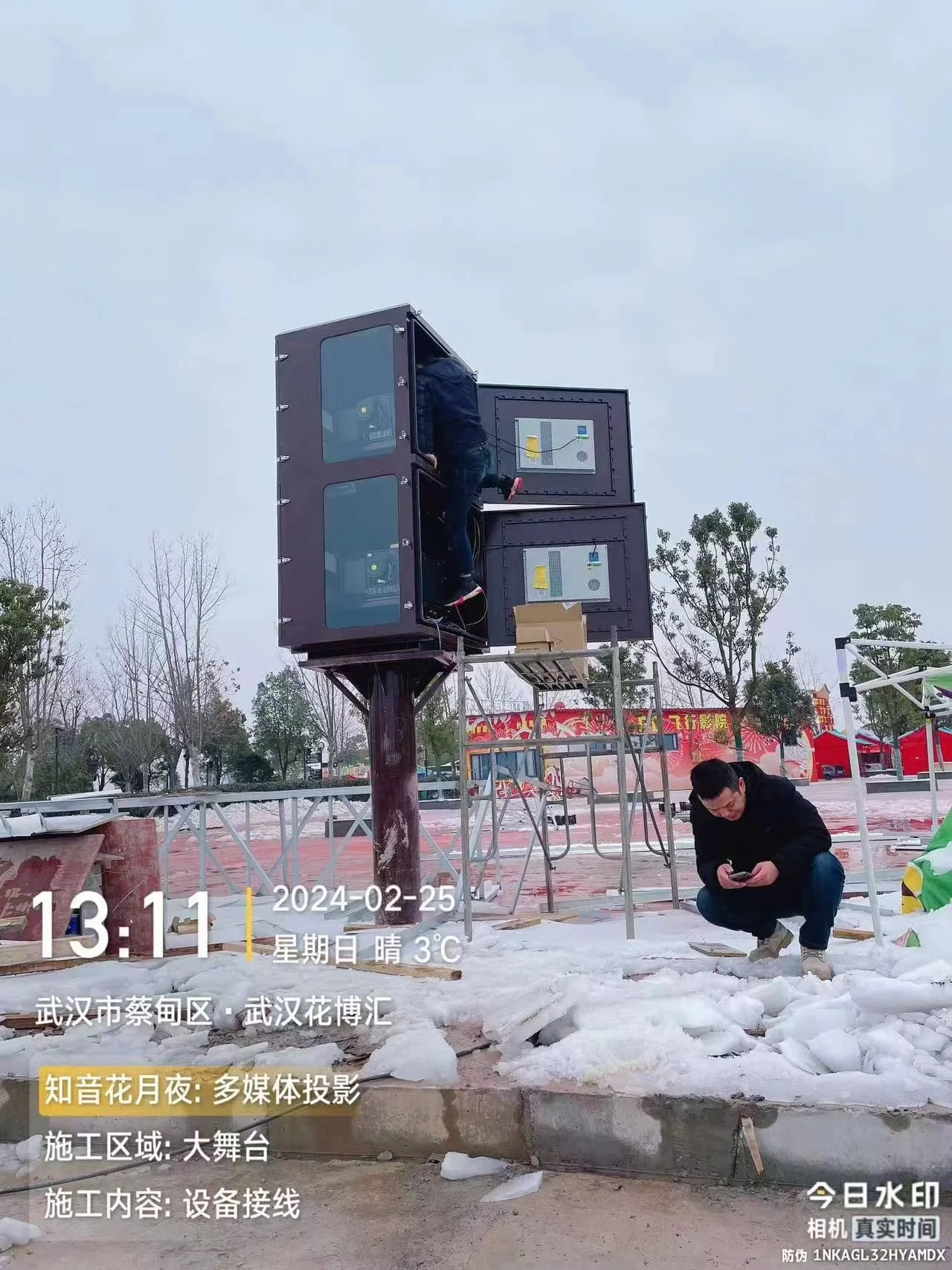
Winter failures usually come from cold startup and condensation. The enclosure has a built-in temperature sensor and heating module. When the internal temperature drops below 5°C, the heating module starts automatically. A heating-capable air conditioner can also be added for dual protection.

What Actually Fails in Winter
Projectors and servers are rated for indoor rooms, not snow and ice. When an outdoor cabinet sits at −10°C overnight:
- Liquid-crystal and laser modules may refuse to start or report errors.
- Temperature swings can draw moist air into the cabinet. When internal surfaces fall below the dew point, moisture condenses on walls, cable insulation and electronics.
- Metal contracts; gaskets and glands can loosen, letting in rain or snow.
Winter protection prevents these problems before the first frost.
Dual Protection: Built-In Heating Module + Heating-Capable Air Conditioner
The enclosure has a temperature sensor that monitors the internal temperature. When the internal temperature drops below 5°C, the built-in heating module starts automatically. When the temperature rises above 5°C, it stops. At the same time, the enclosure can be equipped with a heating-capable air conditioner. Together they provide dual protection:

- First layer: built-in heating module.Handles normal low temperatures and fast heat compensation. It starts below 5°C and stops above 5°C automatically.
- Second layer: heating-capable air conditioner.Provides extra heat in extremely cold weather or when the heating module alone cannot hold the setpoint. It also handles cooling and dehumidification.
- Temperature sensor controls automatic start/stop.No manual switching is needed, which reduces cold-start and condensation risks.
The air conditioner’s heating function can be heat-pump heating and/or electric backup heating. This helps keep the projector above its rated minimum temperature even when the outside temperature is very low.
Controller and Temperature Settings
The heating-capable air conditioner and the built-in heating module can work together. Recommended settings:
- Internal temperature below 5°C: heating module starts; if the temperature still stays below 5°C or the gap is large, the air conditioner’s heating mode assists.
- Above 25–27°C: cooling.
- Relative humidity above 60%: dehumidification.
- Fan runs continuously on low speed for even temperature.
One controller can replace separate heater, thermostat and humidistat hardware. If the enclosure already has a separate heating module and temperature sensor, the air conditioner can handle cooling, dehumidification and extra heating in extreme cold.
Seal Every Opening
Cold weather finds gaps that summer ignored. Before winter:
- Re-torque cable glands and use outdoor-rated, flame-retardant glands.
- Close and blank off unused knockouts.
- Check door gaskets for cracks; replace any that no longer pinch a sheet of paper.
- Verify the AC outdoor unit is not blocked by snow and can drain condensate freely.
Pre-Winter Checklist
| Task | Why |
| Test built-in heating module at low temperature | Confirms automatic heating below 5°C |
| Test air conditioner heating mode | Confirms dual protection is available |
| Calibrate temperature sensor | Avoids start/stop temperature errors |
| Inspect door and window gaskets | Stops wind-driven rain and snow |
| Clear AC outdoor coil | Maintains heating efficiency |
| Log internal RH over one week | Confirms dehumidification works |
Warm Climates Need a Winter Check Too
Even places that rarely freeze see dew points drop and heating modules cycle on cold nights. A controller set for summer-only cooling can still leave condensation inside on cool mornings. Always run the heating/dehumidify side at least once a year.

Heating Module and Heater Sizing Basics
Heating power depends on the cabinet surface area and how cold it gets. As a rule of thumb, allow 50–80 W per square metre of cabinet surface area for −10°C sites, and 100–150 W per square metre for −25°C sites. A typical 42U cabinet has roughly 4–5 m² of surface area, so a 200–400 W heater is usually enough to hold 5°C at −10°C. At −25°C, choose a larger heater or rely on a heating-capable air conditioner for extra heat. The air conditioner’s heat-pump mode often provides useful waste heat; only a small backup heater is needed on the coldest nights.
Cold-Weather Startup Sequence
Do not start a cold projector immediately. Let the heating module and temperature sensor bring the internal temperature above 10°C, and run the fan at low speed for 15–20 minutes, before switching the projector on. This allows LCD panels to stabilize and avoids thermal shock on the window glass. A good controller does this automatically.
Frequently Asked Questions
At what temperature should the heating module start?
5°C internal. It starts below 5°C and stops above 5°C. This keeps the projector above its rated minimum while avoiding unnecessary heating.
Will the heating module and air conditioner heating conflict?
No. The heating module handles basic freeze protection, and the air conditioner provides extra heat. The controller can set priority or link them together.
Will condensation form inside on cold nights?
Yes, if humid air has entered. Run the dehumidify cycle (RH > 60%) and keep the cabinet sealed.
Do I need winter protection in a mild climate?
Yes. Even at 5–10°C mornings, unheated cabinets can condense. A one-time test of the temperature sensor, heating module and air conditioner heating in autumn is enough.

Summary
Protect the enclosure in winter with a built-in heating module and temperature sensor: heating starts below 5°C and stops above 5°C. A heating-capable air conditioner can be added for dual protection. Keep the interior at 5–25°C, seal all glands and openings, and test before the first frost. Contact us for climate-control boards and enclosures rated for −30°C to +50°C operation.

